> For the complete documentation index, see [llms.txt](https://docs.walletx.bot/llms.txt). Markdown versions of documentation pages are available by appending `.md` to page URLs; this page is available as [Markdown](https://docs.walletx.bot/faq/frequently-asked-questions/how-do-i-access-walletx-premium-group-after-purchase-premium-plan.md).
# How do I access WalletX premium group after purchase? (Premium Plan)
In the telegram bot:
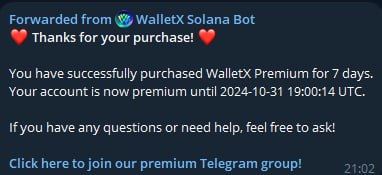
1. After payment confirmation for Premium, you'll receive a link to join "**WalletX on Solana Premium**" group
2. Click the link to join the premium group: 👥**WalletX on Solana Premium**
3. Inside this group, you'll find our alpha channels where we drop our alpha wallets:
* 🔥ALPHA WALLETS
* 🔥ALPHA WALLETS (NO Pump.fun)
⚠️ Important:
* You must first join the main premium group
* All alpha wallet drops are posted in these channels within the group
* Make sure your Telegram username is set up
💁♂️Having troubles accessing? Contact our support:\
@robbie\_walletx or @mika\_walletx
📌 Pro Tip: Pin the premium group chat for easy access!